Certification in SolidWorks
Master SolidWorks and begin your journey in precision-driven 3D mechanical design.
Duration : 6/12 Months
Time : 2 Hours / Day
Mode : Part Time
Venue : In-Centre Programme
Certification in SolidWorks
Turn your passion for product and mechanical design into real-world expertise with our SolidWorks Course. Master parametric modeling, assemblies, and engineering drawings using industry-standard workflows and hands-on projects.
Program Overview
The Certification in SolidWorks is a practical, industry-oriented training program designed to help learners master 3D CAD modeling, mechanical design, and product development workflows. Similar to the structured, skill-focused approach used in our Interior Design diploma, this course builds your expertise from fundamentals to advanced modeling, ensuring job-ready proficiency.
With hands-on projects, real-time practice, and step-by-step learning, you’ll develop the confidence to design mechanical parts, assemblies, sheet metals, and complete engineering drawings using SolidWorks.
Course Modules
Course Modules
- Introduction to CAD, Mechanical Design & SolidWorks Interface
- Sketching Tools, Dimensions & Constraints
- 3D Part Modeling & Feature-Based Design
- Assembly Modeling & Mating Techniques
- Sheet Metal Design
- Surface Modeling
- Weldments & Structural Design
- Drafting, Detailing & Engineering Drawings
- Motion Study & Simulation Basics
- Realistic Rendering with SolidWorks Visualize
- Final Project: Complete Product Design & Documentation
Key Benefits
- Master SolidWorks from basics to advanced features
- Hands-on experience with industry-standard tools
- Practice-based learning with real-world mechanical designs
- Build a professional 3D modeling & engineering portfolio
- Improve technical drawing, product visualization & prototyping skills
- Learn directly from industry experts
Tools & Software Covered
- SolidWorks CAD
- SolidWorks Simulation
- SolidWorks Visualize
- SolidWorks Sheet Metal
- SolidWorks Drafting & Documentation Tools
Career Outcomes
After completing the program, you can pursue roles like:
Mechanical Design Engineer
CAD Engineer
Product Designer
SolidWorks 3D Modeler
Manufacturing Design Engineer
Tool & Die Designer
R&D Design Support Engineer
Frequently Asked Questions (FAQ)
1. Who can join the Certification in SolidWorks?
Anyone interested in mechanical design, manufacturing, engineering, or product development.
2. Do I need prior CAD knowledge?
No. The program starts with basics and gradually moves to advanced modeling.
3. Is the training practical?
Yes—this course includes hands-on practice, projects, assignments, and a final product design.
4. Will I get a certificate?
Yes, you will receive an industry-recognized SolidWorks certification after successful completion.
5. Does this program help with job placements?
Yes. Placement support, portfolio building, and interview preparation are provided.
6. What projects will I work on?
Mechanical components, assemblies, sheet-metal parts, motion studies, and a final engineered
product.
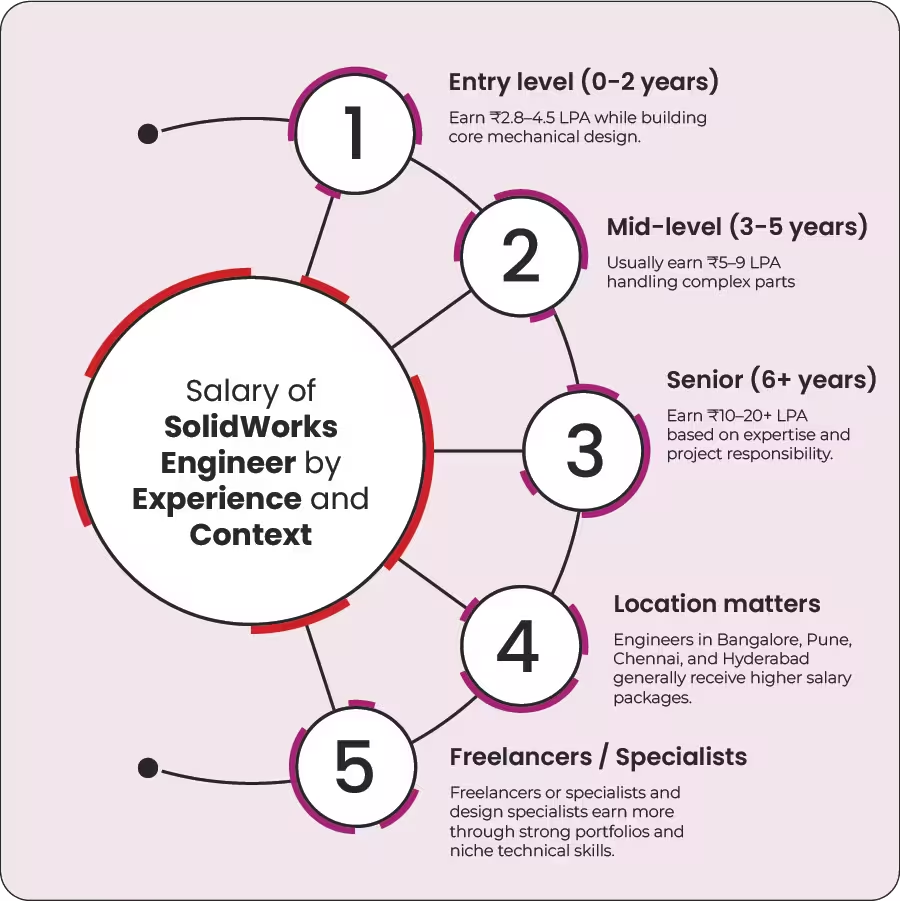
SolidWorks Engineer Salary Breakdown