Certification in Mech AutoCAD
Master Technical Drafting & Mechanical Design with Industry-Standard AutoCAD Skills.
Duration : 6/12 Months
Time : 2 Hours / Day
Mode : Part Time
Venue : In-Centre Programme
Certification in Mech AutoCAD
Transform your curiosity for mechanical engineering into practical AutoCAD skills. This course takes you from fundamentals to advanced mechanical drafting with hands-on practice, expert mentorship, and job-ready preparation.
Program Overview
This certification takes you from the basics of technical drawing to professional-level mechanical drafting. You will learn how to read, create, and modify engineering drawings, understand manufacturing symbols, and confidently prepare industry-standard mechanical documentation. Just like the PDF’s approach to combining fundamentals + practical tools, this course blends concept clarity with hands-on AutoCAD training. By the end of the course, you will be able to produce accurate 2D mechanical drawings used in engineering, fabrication, and production environments.
Course Modules
Introduction to Mechanical Drafting
- Basics of engineering drawing
- Drawing standards (ISO & BIS)
- Orthographic & isometric drawings
AutoCAD Fundamentals
- User interface & basic tools
- Line, trim, offset, extend commands
- Layers, line types & object properties
2D Mechanical Drawing
- Machine components drafting
- Sectional views & detailed drawings
- Symbols, annotations & tolerances
Dimensioning & GD&T Essentials
- Linear, angular & radius dimensions
- Fits, tolerances & surface roughness
- Manufacturing symbols
Assembly & Exploded Drawings
- Multi-component assemblies
- BOM (Bill of Materials)
- Exploded technical views
Plotting & Documentation
- Title blocks & sheet settings
- Scale & layout preparation
- Preparing drawings for manufacturing
Final Project
- Complete mechanical drafting project
- Real-world industry-based assignment
- Portfolio development
Tools & Software Covered
- AutoCAD (2D Drafting & Documentation)
- Engineering Drawing Standards
- Mechanical Detailing Tools
Key Benefits
- Learn AutoCAD from fundamentals to advanced mechanical drafting
- Hands-on project-based training
- Master industry-relevant mechanical drawing skills
- Build a professional portfolio for job applications
- Learn directly from mechanical design professionals
Career Outcomes
After completing the program, you can pursue roles like:
Mechanical Draftsman
CAD Designer (Mechanical)
AutoCAD Technician
Junior Design Engineer
Production/Manufacturing Drawing Specialist
Freelance CAD Drafting Professional
Frequently Asked Questions (FAQ)
1. Who can join this course?
Anyone interested in mechanical design or drafting—students, diploma holders, engineers, or working professionals.
2. Do I need previous design experience?
No. We start with the basics and build up to advanced drafting skills.
3. Is this course practical?
Yes—this course is fully practical with real-time mechanical drawing exercises and industry-level
assignments.
4. Will I learn complete AutoCAD drafting?
You will learn full 2D mechanical AutoCAD drafting, documentation, and manufacturing drawing
preparation.
5. Will I receive a certificate?
Yes, you will receive a Certification in Mech AutoCAD upon completion.
6. Do you offer placement assistance?
Yes. We provide guidance for interviews, resume preparation, and portfolio building.
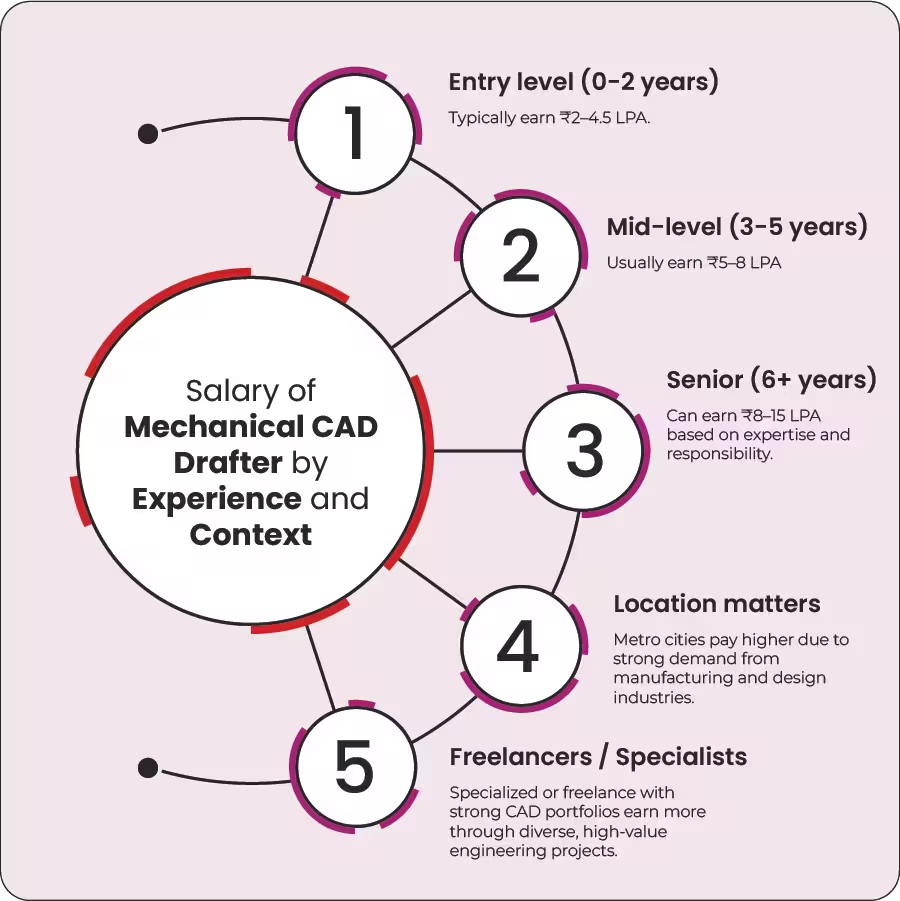
Mechanical CAD Drafter Salary Breakdown