Certification in Video Editing
Master Professional Video Editing Skills & Build a Job-Ready Portfolio
Duration : 6/12 Months
Time : 2 Hours / Day
Mode : Part Time
Venue : In-Centre Programme
AI Powered Certification in Video Editing
Turn your creative vision into impactful visuals with our Video Editing Course. Master professional editing techniques, motion storytelling, and post-production workflows with hands-on training and career-focused guidance.
Program Overview
Step into the world of digital creativity and transform your passion for storytelling into a professional video editing skillset. This Certification in Video Editing is designed to take you from the fundamentals to advanced editing techniques—helping you create compelling videos for YouTube, brands, films, social media, and digital marketing campaigns.
Inspired by the structured style of the Executive Diploma PDF, this program blends creative training + industry tools + real-time projects for complete skill development.
You’ll understand video composition, color styles, sound design, transitions, motion graphics, and editing workflows that bring visuals to life. Through hands-on assignments and project-based learning, you’ll gain the confidence and technical expertise to work in professional editing environments.
Course Modules
Course Modules
- Basics of Video Editing & Visual Storytelling
- Editing Principles, Composition & Timing
- Footage Management & Workflow Setup
- Cutting, Trimming & Sequencing Techniques
- Color Correction & Color Grading
- Sound Editing, Noise Cleanup & Audio Mixing
- Transitions, Effects & Creative Cuts
- Motion Graphics & Titles (Essential Graphics)
- Green Screen / Chroma Key Editing
- YouTube, Social Media & Short-Form Video Editing
- Export Settings, Formats & Delivery Standards
- Final Project: Complete Edited Video
Key Benefits
- Learn editing from beginner to advanced levels
- Hands-on training with industry-standard software
- Real-time practice through projects & assignments
- Build a job-ready professional showreel
- Become confident in video editing, color grading & motion graphics
- Learn YouTube-friendly and social media-optimized editing techniques
Tools & Software Covered
- Adobe Premiere Pro
- Adobe After Effects
- Adobe Audition
- Photoshop (for thumbnails & graphics)
Career Outcomes
Video Editor
YouTube Video Editor
Social Media Content Editor
Short-Form Video
Motion Graphics Artist
Post-Production Assistant
Reels Editor
Freelance Video Editor
Frequently Asked Questions (FAQ)
1. Who can join this Certification in Video Editing?
2. Do I need a high-end computer?
3. Which software will I learn?
4. Is this course practical?
5. Will I receive a certificate?
6. What projects will I work on?
7. Can I start earning after this course?
8. Do you offer placement support?
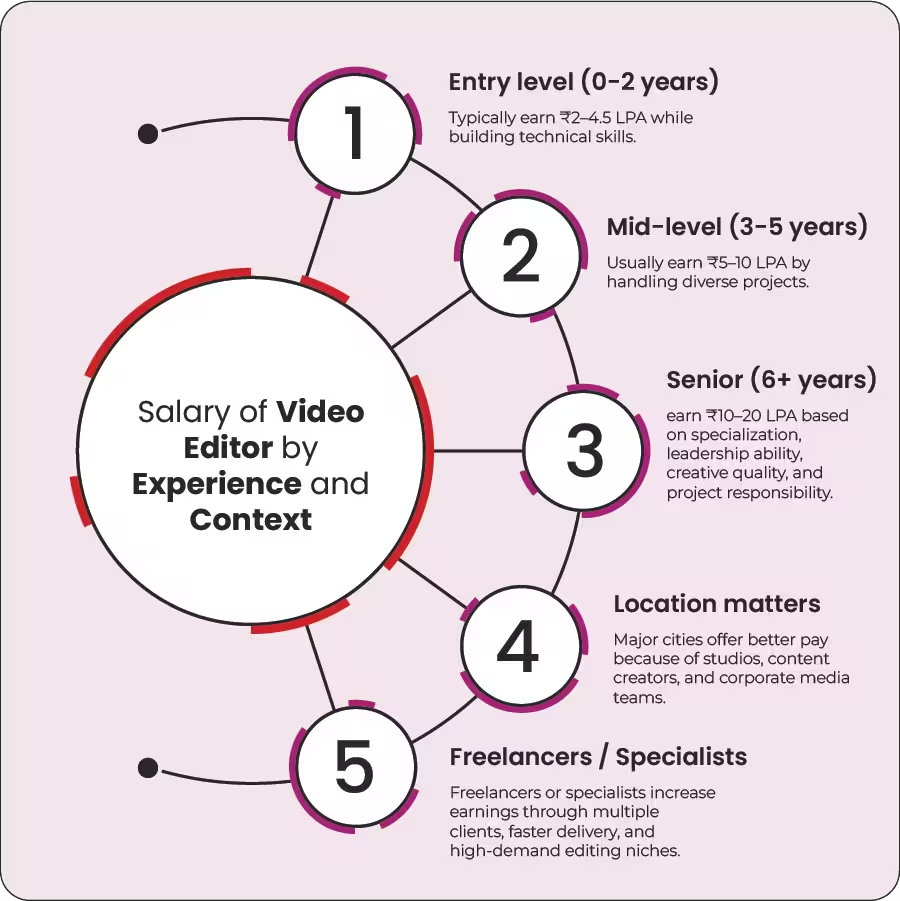
Video Editor Salary Breakdown